LangGraph for JS devs: graphs and nodes without the headache
Graph, Node, Edge, State: four scary words that fit inside a cooking recipe. Explained through a rap battle between Molière and Robespierre.
5 min read
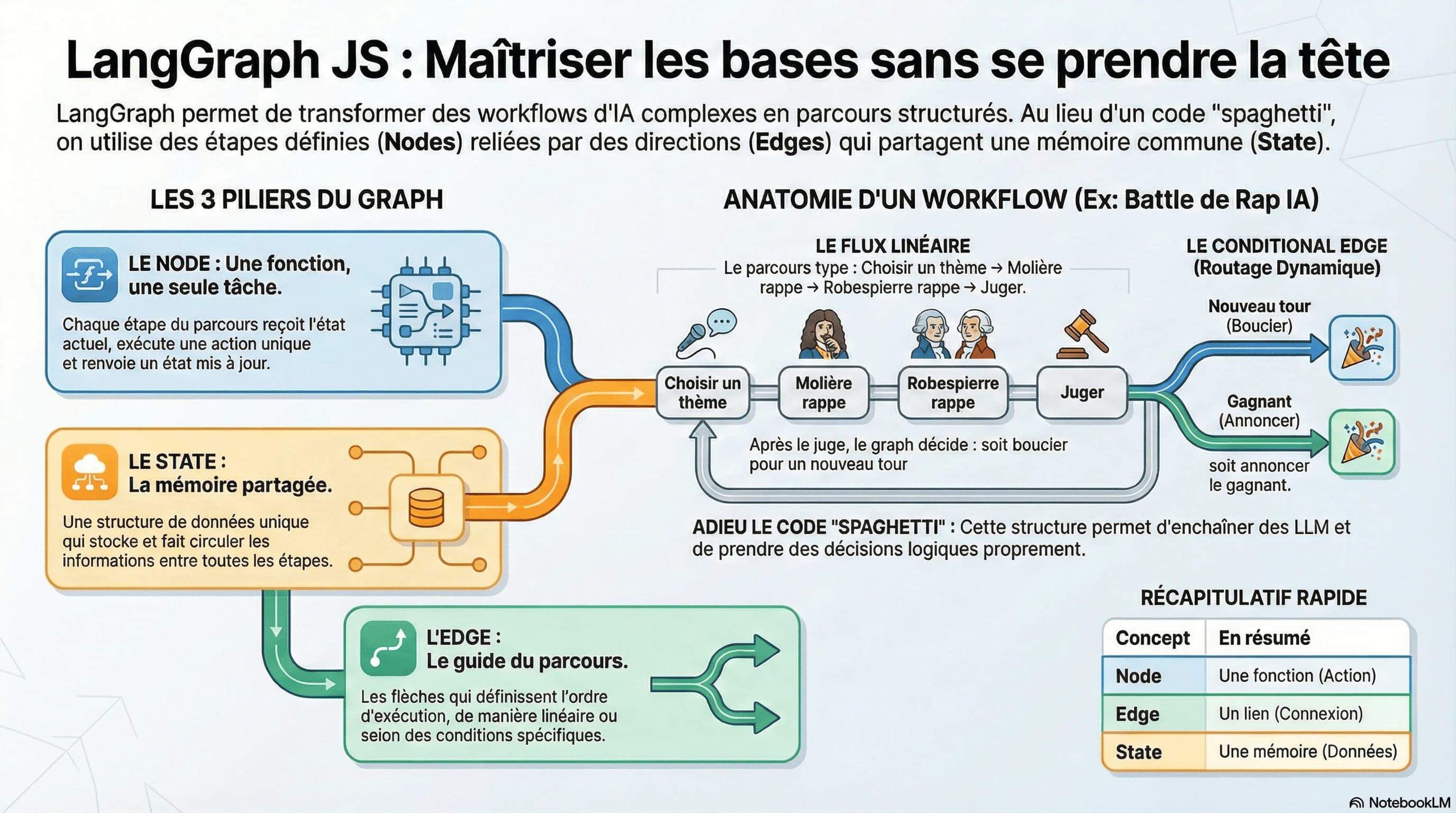
When I started learning LangGraph, I got stuck on the basic concepts.
Graph? Node? Edge? State?
It looked complicated. It is actually simple once you have the right analogy.
A graph is just a route
Picture a cooking recipe.
You have steps (chop the vegetables, fry them, season…) and an order (you chop before you fry).
A graph in LangGraph is the same:
- The steps = the Nodes
- The order = the Edges (the arrows between the steps)
That is all it is…
A node is a function that does ONE thing
A node receives a state, does something, and returns a new state.
const chopTheVegetables = (state: RecipeState) => {
  return {
    vegetables: ["carrots", "onions"],
    step: "vegetables chopped"
  };
};
Each node has a single responsibility. No more.
The state is the memory of the route
The state holds all the information that travels between the nodes.
In LangGraph, you define it with Annotations:
const RecipeState = Annotation.Root({
  vegetables: Annotation<string[]>,
  seasoning: Annotation<string>,
  step: Annotation<string>,
});
Every node can read the state and change it. The state evolves along the route.
A concrete example: an AI rap battle 🎤
To really get it with something fun: a rap battle between Molière and Robespierre, judged by an LLM.
The battle state
const BattleState = Annotation.Root({
  theme: Annotation<string>,
  moliereVerse: Annotation<string>,
  robespierreVerse: Annotation<string>,
  moliereScore: Annotation<number>,
  robespierreScore: Annotation<number>,
  round: Annotation<number>,
  winner: Annotation<string>,
});
The nodes
pickTheme→ generates a random battle thememoliereRaps→ Molière drops his verse (alexandrines, ABAB rhymes)robespierreRaps→ Robespierre answers (revolutionary rhetoric, AABB rhymes)judge→ a third LLM scores both versesannounceWinner→ declares the winner
The edges (the route)
pickTheme → moliereRaps → robespierreRaps → judge → ...
But there is a twist: after judge, we either want another round or the end.
That is where conditional edges come in.
Conditional edges: dynamic routing
Sometimes the route is not linear. It depends on a condition.
graph.addConditionalEdges("judge", (state) => {
  if (state.round < 3) {
    return "moliereRaps"; // the battle continues
  }
  return "announceWinner"; // 3 rounds = the end
});
The flow changes according to the state. That is the power of LangGraph.
Visual recap
┌─────────────┐
│  pickTheme  │
└──────┬──────┘
       ▼
┌─────────────┐
│ moliereRaps │◄──────────┐
└──────┬──────┘           │
       ▼                  │
┌─────────────────┐       │
│ robespierreRaps │       │
└──────┬──────────┘       │
       ▼                  │
┌─────────────┐   round < 3
│    judge    │───────────┘
└──────┬──────┘
       │ round >= 3
       ▼
┌────────────────┐
│ announceWinner │
└────────────────┘
What I took away
| Concept | In plain words |
|---|---|
| Graph | A route with steps |
| Node | A function that does ONE thing |
| Edge | An arrow between two steps |
| State | The memory shared between the nodes |
| Conditional edge | An arrow that depends on a condition |
Why is it useful?
When you build AI agents, you often need to:
- chain several LLM calls
- make decisions based on the answers
- keep state between the steps
LangGraph structures all of that cleanly. No spaghetti code.
Going further
Just getting started with LangGraph? Write to me about what is blocking you — I might turn it into an article.
Covered here
- AI
- LangGraph
- TypeScript
- JavaScript