ReAct explained for devs: the pattern behind AI agents
Reason, act, observe, loop. The pattern that powers LangChain, LangGraph and CrewAI, and why the LLM never executes the actions itself.
7 min read
When people talk about AI agents, they often picture a magic black box that "thinks" and "acts" on its own.
In reality, behind most agents — the ones in LangChain, LangGraph, CrewAI — there is a simple, elegant pattern: ReAct.
If you are a JavaScript or TypeScript dev and you want to understand how an AI agent really works under the hood, this article is for you.
The problem: an LLM cannot act
A classic LLM (GPT, Claude, Llama…) has a fundamental limit: it can only generate text.
It cannot:
- search Google
- read a database
- call an API
- run code
If you ask it "what is the weather in Paris?", it will answer something plausible… but probably wrong, because it has no access to the real world.
That is the hallucination problem: the model "makes things up" when it does not know.
The solution: ReAct (Reasoning + Acting)
ReAct comes from a research paper by Princeton and Google published in 2022. The idea fits in one sentence:
Make the model think out loud, and give it tools to check its thinking.
The name is a merge of two words:
- Reasoning — the model reasons step by step
- Acting — the model can call external tools
Before ReAct, these two abilities existed separately:
| Approach | What it does | The problem |
|---|---|---|
| Chain-of-Thought | The model reasons step by step | It cannot verify → it hallucinates |
| Action-only | The model calls tools | It does not reason about why → it acts blind |
ReAct combines both in a loop: reason → act → observe the result → reason again.
The ReAct cycle in 4 steps
Here is what happens when you ask a ReAct agent a question:
📝 Question : "Who won the last Ballon d'Or?"

💭 Thought  : "I do not know the most recent result.
               I will check on Wikipedia."

⚡ Action   : WikipediaSearch("Ballon d'Or 2024")

👁️ Observation : "The 2024 Ballon d'Or was awarded to..."

💭 Thought  : "I have the information, I can answer."

✅ Final Answer : "The 2024 Ballon d'Or was won by..."
It is a loop. If the first search is not enough, the agent goes round again: Thought → Action → Observation, until it has enough to conclude.
The full diagram
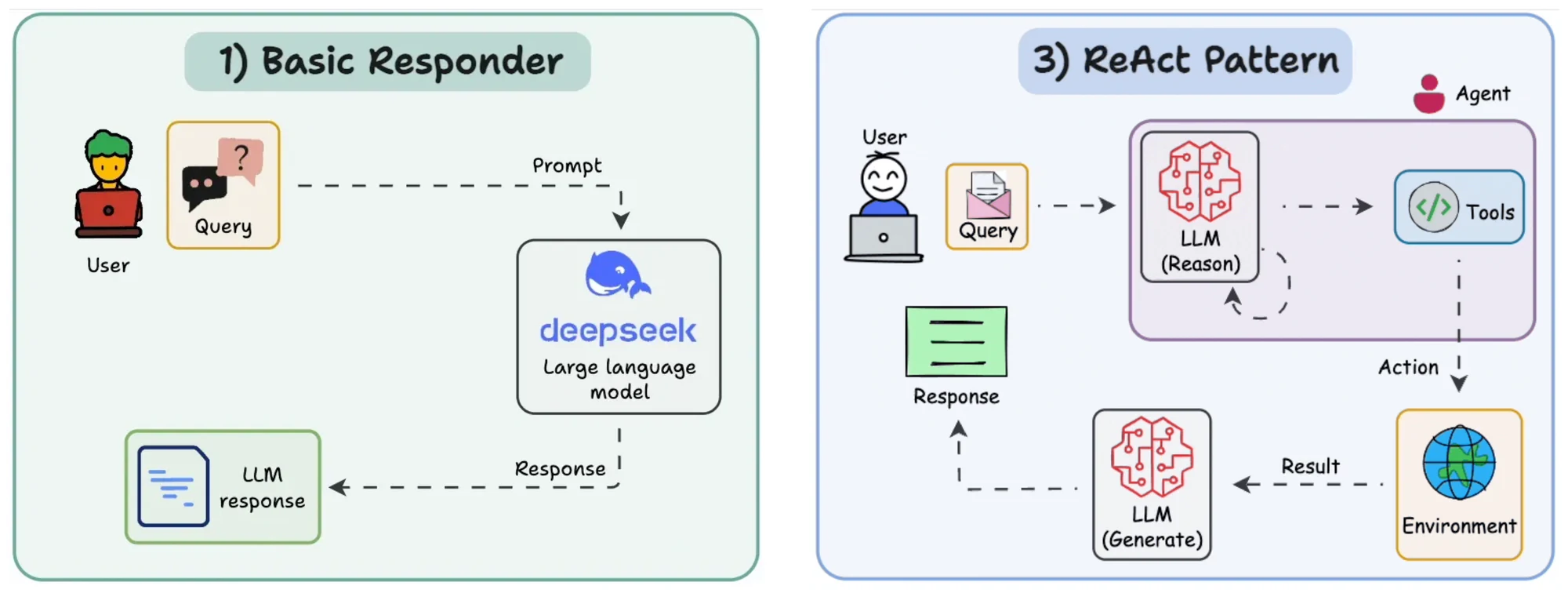
The key point: the LLM does NOT perform the actions
This is the most important thing to understand.
When the agent writes Action: WikipediaSearch("Ballon d'Or"), it is not actually searching Wikipedia. It is generating text that says it wants to search.
It is the runtime (LangGraph, LangChain, or any other framework) that:
- Parses the LLM's output
- Detects that there is an action to run
- Executes the tool (API call, DB query, etc.)
- Feeds the result back as an "Observation" in the prompt
- Calls the LLM again with the updated context
The LLM is the brain that decides what to do. The runtime is the hands that do it.
┌─────────────────────────────────┐
│           LLM (brain)           │
│                                 │
│  "I want to search Wikipedia…"  │
│  (generates text)               │
└───────────────┬─────────────────┘
                │  parsed text
                ▼
┌─────────────────────────────────┐
│    Runtime / LangGraph (hands)  │
│                                 │
│  → Parses the action            │
│  → Calls the Wikipedia API      │
│  → Gets the result              │
│  → Feeds it back into the prompt│
└─────────────────────────────────┘
Working memory: the scratchpad
An LLM is stateless — it has no memory between two calls. Every call, it is as if it woke up for the first time.
So how does the agent remember what it has already found?
Thanks to the scratchpad. It is a piece of text that accumulates the whole history of previous turns (Thought + Action + Observation) and is sent back to the LLM on every new call.
A concrete example
The agent has to compare the GDP of France and Germany.
Turn 1 — the scratchpad is empty:
Thought: I need to find France's GDP.
Action: WikiSearch("France GDP 2024")
Observation: €2,800 billion
Turn 2 — the scratchpad contains turn 1:
[full turn 1 visible to the LLM]

Thought: I have France. Now Germany.
Action: WikiSearch("Germany GDP 2024")
Observation: €3,500 billion
Turn 3 — the scratchpad contains turns 1 + 2:
[turns 1 and 2 visible to the LLM]

Thought: I have both numbers, I can compare.
Final Answer: Germany's GDP (€3,500bn) is higher than
              France's (€2,800bn)...
The size problem
The more turns the agent takes, the bigger the scratchpad gets, and the more tokens it burns (= money).
The strategies to handle it:
- Rolling window: keep only the last N turns
- Summary: compress old turns into a paragraph (via a dedicated LLM call)
- Episodic: keep only the key results, not the intermediate reasoning
It becomes a real engineering topic once your agent makes 10+ tool calls.
Where do function calls fit in?
If you have used the OpenAI or Claude API recently, you know function calling: the model returns a structured JSON object { "tool": "...", "args": {...} } directly, instead of free text.
It is more reliable than text parsing, but the conceptual pattern stays the same:
| Classic ReAct (text) | Modern function calling | |
|---|---|---|
| Format | Free text parsed with regex | Structured JSON |
| Reasoning | Visible ("Thought: …") | Implicit (in the model's head) |
| Reliability | Fragile (parsing) | Robust (typed) |
| Debugging | Easy (you read the reasoning) | Harder |
Frameworks like LangGraph support both, and in practice modern agents use function calling under the hood while following ReAct logic.
Why this matters to you as a dev
If you are a JavaScript/TypeScript developer and you want to build AI agents, understanding ReAct means understanding the fundamental pattern everything rests on.
Whether you use LangGraph, LangChain, the Vercel AI SDK, or you write your own agent from scratch — it is always the same loop:
Reason → Decide → Act → Observe → Loop
Once you have got that, the rest (RAG, multi-agents, planning) is variations and compositions of the same pattern.
Covered here
- AI
- LLM
- agents
- LangGraph
- TypeScript